Choosing Semi-In-Ear Wireless Earbuds is less about chasing impressive numbers and more about finding a pair that works in your daily routine. Their open, lightweight fit can feel comfortable during a commute or a long call, but it may provide less isolation in a noisy room. A sleek product photo cannot show whether the earbuds will stay secure in your ears. Fit is personal.
Audio researcher Dr. Sean Olive’s work examines how listeners judge headphone sound. A practical paraphrase of that research is: “Choose by listening preference, not specifications alone.” Treat that as guidance, not a direct quotation. When comparing earbuds, play a familiar song and listen for clear vocals, steady bass, and details that do not become harsh at moderate volume. Then make a short call. Check whether your voice sounds natural and whether the microphone picks up nearby traffic.
Look beyond sound, too. Check battery life, case size, touch controls, Bluetooth stability, and water resistance against your actual needs. Try different earbud shapes when possible; a small change in angle can affect comfort and bass. Specs help narrow the options. They cannot promise a perfect fit. I would not trust a five-minute demo alone, either. Still, a focused test beats buying by appearance. This guide explains what to compare, which trade-offs matter, and how to choose with fewer surprises.
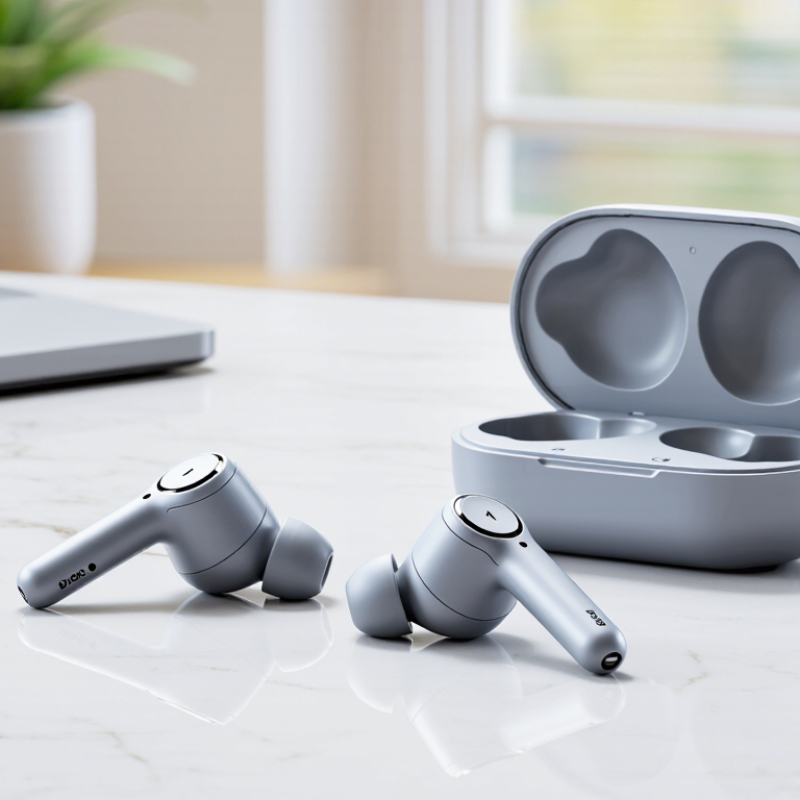
Semi-in-ear wireless earbuds rest in the outer ear, with their speaker openings positioned near the ear canal. Unlike in-ear models, they usually lack soft silicone tips that seal inside the canal. Their shells are often smooth and firm, so comfort depends heavily on how their shape matches your ears. No single shape fits everyone.
The open fit can feel less pressurized during a walk or a long video call. It also lets more surrounding sound reach you, which can help you stay aware of nearby activity. There is a trade-off: traffic, fans, and busy cafés may mask quieter audio. Bass can also sound lighter because the earbuds do not create a tight seal. Sound may escape at higher volumes.
That sounds comfortable. It isn’t guaranteed. When comparing designs, check whether each earbud stays put as you turn your head or chew. Notice any hard edge pressing against the outer ear after several minutes. I used to assume a lighter shell would always feel better; a poor shape can still create a sore spot. Microphone quality, button placement, and battery life matter too, but fit is personal. If possible, try the earbuds in a quiet room before relying on them for a full commute.
With semi-in-ear wireless earbuds, comfort depends on how the housing rests against your outer ear, not just its weight. A shape that feels fine while sitting may shift when you walk, chew, or turn your head. Try both earbuds for at least ten minutes. Notice pressure near the ear opening, rubbing along the outer ear, and whether the fit loosens with movement. Small details matter.
A loose fit can mean repeated adjustments; a tight contact point may become sore over a longer listen. Ear shapes vary, so another person’s “perfect fit” is weak evidence for yours. If possible, test the earbuds with your usual glasses and during a short walk. I would not judge comfort from a quick shop demo alone. That test can miss pressure that builds slowly.
Fit also affects listening habits. Semi-in-ear designs usually leave the ear canal less sealed, so surrounding noise may remain noticeable. In its 2019 Global Standard for Safe Listening Devices and Systems, WHO and ITU set an adult reference of up to 80 dB for 40 hours per week. This is a listening guideline, not a fit score; still, raising volume to overcome noisy streets can undermine safer listening. Check whether speech and music remain clear at a moderate level in your typical setting. If the earbuds hurt, slip repeatedly, or need constant repositioning, their comfort is probably not right for you.
| Fit and Comfort Dimension | What to Check | How It Affects Comfort | Signs of a Suitable Fit | Possible Trade-Off |
|---|---|---|---|---|
| Ear shape and contact points | Whether the earbud shell rests steadily in the outer ear without forcing against the concha or other sensitive areas. | Semi-in-ear earbuds rely on the shape of the outer ear for support, so a shell that suits one person may feel loose or press uncomfortably for another. | The earbuds sit securely when you move your head and do not create a sharp or concentrated pressure point. | A fixed-shape shell can be convenient, but it offers less fit adjustment than earbuds with interchangeable sealing tips. |
| Retention during movement | Stability while walking, turning your head, or speaking; check whether the earbuds gradually shift or need frequent adjustment. | A poor fit can cause the earbuds to loosen or fall out, interrupting listening and making them less suitable for active use. | Each earbud remains in place during ordinary daily movement without being pushed tightly into the ear. | A looser fit may feel less intrusive, but it may provide less reliable retention during exercise or vigorous movement. |
| Pressure and wear duration | Notice pressure, soreness, or a “full” sensation during a listening session, and whether discomfort increases over time. | Pressure from the shell can become more noticeable with extended wear, even when the initial fit feels comfortable. | The earbuds remain comfortable for the length of a typical listening session, with no persistent soreness or need to reposition them. | A snug fit can improve stability, but excessive contact may reduce long-term comfort. |
| Weight and balance | Check whether the earbuds feel balanced in the ear or pull outward, especially when the stems or outer housings are relatively prominent. | Uneven weight or leverage can make an earbud feel as if it is gradually slipping, even if its shell initially feels comfortable. | The earbuds feel stable without a noticeable pulling sensation or repeated readjustment. | A larger housing may allow room for additional components, but its size and balance should still suit your ears. |
| Material and surface contact | Consider the finish and materials where the earbud touches your skin, and check for irritation or discomfort during use. | Surface feel can affect comfort, particularly for people with sensitive skin or those who wear earbuds frequently. | The contact surfaces feel smooth and comfortable, without rubbing or irritation during normal use. | A smooth surface may feel comfortable, but it does not by itself guarantee that the shell shape will fit securely. |
| Open fit and awareness | Decide whether you want to hear more of your surroundings while listening, and consider where you plan to use the earbuds. | Semi-in-ear designs generally do not form the same sealed fit as in-ear earbuds, which can make them feel less occlusive. | The fit feels natural for your intended setting, and you can hear enough of your surroundings when awareness is important. | An open, less-sealed fit can allow more ambient sound in and may provide less passive isolation in noisy environments. |
| Personal fit test | Try both earbuds, wear them for a typical listening session, and reassess comfort and stability after moving around. | Fit depends on individual ear shape and cannot be reliably judged from appearance or specifications alone. | Both earbuds feel comfortable, stay in position, and do not require repeated adjustment. | When possible, check the retailer’s return policy before buying, since a real-world fit test is the most useful way to assess comfort. |
Fit is personal: use these checks as a comparison guide rather than assuming that one shell shape will suit every listener.
With semi-in-ear earbuds, fit changes what you hear. Because the tips do not seal the canal, bass can feel lighter, and outside noise remains noticeable. Try a familiar track at low volume, then compare vocals, cymbals, and kick drum. Small shifts matter. An earbud that slips while walking may lose bass, even if its tuning looks strong on paper.
Check whether the sound stays balanced across podcasts, music, and calls, rather than judging it with one bass-heavy song. If an equalizer is available, modest adjustments should help; needing extreme boosts may signal a poor match for your ears. Comfort is personal. I would retest the fit after wearing the earbuds for a while, since a quick try can be misleading.
For wireless performance, compare Bluetooth stability in rooms with walls, not only the advertised range. Check multipoint if you switch between a laptop and phone, and confirm both devices support the features you expect. Codec labels can matter, but compatibility on both ends matters more; a newer number alone does not promise clearer sound. For video, look for a low-latency mode and test lip sync on your own device. Microphone samples recorded outdoors can reveal wind handling better than a spec sheet. Specs can mislead.
Compare sound support and connection needs—not just headline specifications.
Connectivity: The chart shows theoretical maximum ranges for Bluetooth power classes. Actual range can be shorter due to walls, interference, device design, and surroundings. Check codec compatibility with your phone, multipoint support, and latency for calls or video.
Sound: Compare supported audio codecs and independent listening or measurement tests. Semi-in-ear fit can affect bass response and isolation, so comfort and a secure fit matter as much as listed frequency-response figures.
Battery claims need context. Compare earbuds’ playback time per charge with the case’s total reserve; these are different figures. Check whether the test used moderate volume, since calls, loud playback, and frequent reconnection can shorten real-world runtime. A useful buying target is enough charge for your longest commute, with a case that can cover several days. Bluetooth SIG’s 2024 Market Update reports 5.4 billion Bluetooth device shipments in 2023, showing how common wireless connections have become. It does not measure earbud battery life, so treat it as market context, not proof of longer runtimes.
Controls matter most when your hands are busy. Physical buttons are easier to locate with gloves, while touch panels may misread a wet finger or a quick adjustment. Try the controls before buying, if possible, and check whether volume, calls, and playback can be managed without reaching for a phone. Small details count. For durability, read the exact IP rating: under IEC 60529, IPX4 indicates resistance to splashing, not immersion. Also inspect the charging case hinge and port; these often face daily wear. One imperfect trade-off remains: a compact case is easier to carry, but may offer fewer recharges. Compare stated test conditions, not just the largest number on the box.
Choose a price ceiling before comparing features. Grand View Research estimated the global wireless-headphones market at USD 75.2 billion in 2023, with projected annual growth of 12.9% through 2030. That market figure signals plenty of choice, not that a higher price guarantees a better fit.
For commuting, prioritize stable Bluetooth, clear call microphones, and a charging case that lasts your usual day.
For desk use, comfort and easy device switching may matter more than premium noise features.
Tips: Check the return policy, then wear the earbuds for 20 minutes at home. Notice pressure, slipping, and whether voices sound natural. A quick fit test beats a long feature list.
For a tight budget, compare battery life, connection stability, and warranty before paying extra for app controls. Semi-in-ear designs leave the ear canal less sealed, which can feel lighter but may provide less isolation in loud spaces.
Keep volume moderate: WHO and ITU estimate that over one billion young people risk hearing loss from unsafe listening practices. Their guidance supports safe listening, not a specific earbud choice. Specs can look convincing; fit is personal, and I would not assume the first pair will suit every ear.
Their tips do not seal the ear canal, so bass may feel lighter and outside noise remains noticeable. Fit matters.
Play a familiar track quietly. Listen to vocals, cymbals, and the kick drum, then check a podcast and a call. One song is not enough.
Slipping can change the sound, especially the bass. Try walking with them before deciding. I might retest after a longer wear, too.
Small adjustments can help. If you need extreme boosts, the fit or tuning may not suit your ears. Specs can mislead.
Test the connection in rooms with walls, not just beside your phone. If you switch between a laptop and phone, check multipoint support on both devices.
No. Both connected devices need compatible support, and a newer label alone does not promise better audio.
Listen to outdoor microphone samples for wind handling. For videos, test lip sync on your own device using any low-latency mode.
Set a spending limit first. For commuting, compare connection stability, call clarity, and case battery life; for desk use, comfort and device switching may matter more.
Check the return policy, then wear them at home for 20 minutes. Notice pressure, slipping, and whether voices sound natural. Keep volume moderate.
Choosing the best Semi-In-Ear Wireless Earbuds starts with understanding their open, lightweight design: they rest at the entrance of the ear rather than sealing the ear canal. This can feel less intrusive and help you stay aware of your surroundings, but fit varies from person to person. Consider the shape and stability, especially if you plan to wear them for long periods or while moving around.
Next, compare sound quality, microphone clarity, wireless connection stability, and compatibility with your devices. Check how long the earbuds last on a charge, whether the case provides extra power, and how easy the controls are to use. Durability features such as resistance to sweat can also matter for daily activities. Finally, balance these features against your budget and routine: the right choice is the pair that feels comfortable and reliably covers the listening, calling, and battery needs you actually have.